
Call us
Click for remote support
Create a support ticket
The year has gone fast and with it being October not only is it spooky season but also Cyber Security Awareness Month. The overarching theme for 2022 is ‘Have you been hacked?’ as outlined by the Australian Cyber Security Centre.
In 2022 alone, multiple Australians were hacked and their personal information was stolen. The hackers then used this information to commit identity theft and other crimes. The victims were left feeling violated and helpless. They had to deal with the fallout of the hacking, which included cancelling credit cards, changing passwords, and dealing with fraudulent charges. One example of this was ealier this year when a group of Chinese hackers attacked in retaliation for Australia‘s decision to ban Huawei from its 5G network. The hackers gained access to Australian government and corporate networks, and leaked sensitive information. This caused major disruption to the Australian economy and diplomatic relations with China. Other previous examples include:
Now that we understand the severity of hacking lets take a look at the ACSC’s month plan for Cyber Awareness.
In this section of the website drop down you are given a brief explanation along with four items. A tool, quiz and two posters to help you determine if have been hacked.
For a basic rundown If you think you may have been hacked, look for signs that your computer or account has been compromised, such as:
If you see any of these signs, it‘s important to take action right away to secure your account and prevent further damage.
In this section of the website drop down you are given a brief explanation along with three items. How to check your account settings for Outlook, How to check your account settings for Gmail and a what to do if someone has hacked your email guide.
For a basic rundown if you believe your business has been targeted by email fraud or compromise, you should take the following steps:
Similarly if you (as a personal account holder) have been the target of email fraud or compromise, you should immediately report the incident to the authorities. You should also change your password and take steps to secure your account including enabling two-factor authentication, s canning your computer for malware and viruses and contacting your email provider / bank / other to advise them of the hack.
In this section of the website drop down you are given a brief explanation along with fourteen resources. Two quizzes:
One poster:
11 Resources, five of which inform about resources available to help keep your email secure:
And six of which show you how to secure your accounts and devices:
In a few words to summarize all the above it can be said that are many ways to keep a person and business safe online from hackers. Some of the most important things to do are to keep all software up to date, use strong passwords, and avoid clicking on links from unknown sources.
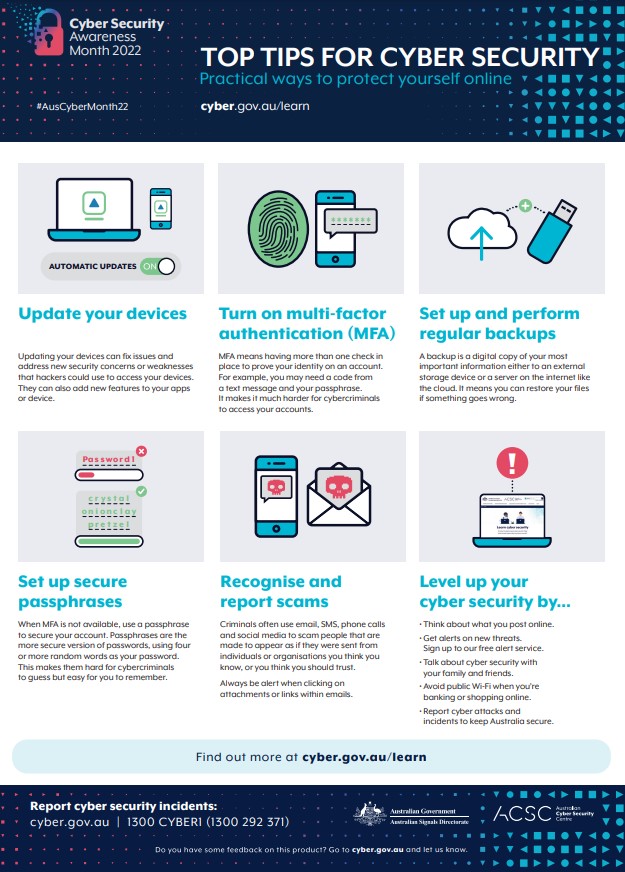
Now is the perfect time to protect yourself online. In this section of the website drop down you are given a six quizzes to test your knowledge and five additional resources.
All of these resources, quizzes, tips and tricks together help to inform businesses and general users about the risks involved of engaging online. We learn not only how to spot hackers but also how to know if we have been hacked and what steps to take to both avoid the occurrence and overcome it.
We Fix IT also heavily recommends using multi-factor authentication on accounts as well as installing antivirus software and getting your laptop / PC regularly checked out to ensure it is secure. Some services/products we can supply and heavily suggest include:
Want to learn more?
